Fieldhand
Built for contractors

Simplify Construction Project Management with FieldHand

Manage proposals, change orders, project finances, documents, and customer workflows in one organized platform built for contractors.

Projects / Harbor St. ResidenceActive
Contract value
$203,750
Payments recorded
$166,850
Remaining
$36,900
Proposal & change orders
Initial Proposal$184,500
CO #1 · Beam upgrade+$12,400
CO #2 · Electrical+$6,850
CO #3 · PantryPending
Recent transactions
CO #2 paymentJun 27+$6,850
Progress draw 2Jun 20+$46,125
Electrical subJun 11 · CO #2−$4,200
DocumentsProposal.pdfSignedCO-3.pdfAwaiting signature
Illustrative sample data
01 · Services

Everything You Need to Manage Your Projects

FieldHand brings essential contractor workflows together to help you stay organized, maintain visibility, and manage projects with greater confidence.

Proposal Management

Create, organize, and manage initial project proposals with clear project details and pricing.

Change Order Management

Track project changes, additional work, revised pricing, and change order history.

Financial Tracking

Maintain visibility into project transactions and financial activity associated with proposals and change orders.

Transaction Ledger

Review transaction history at the individual proposal or change order level, as well as through a consolidated financial ledger.

Document Management

Keep important project documents organized and accessible throughout the project lifecycle.

Digital Document Signing

Support digital signing workflows for project proposals and related documents.

02 · Features

Powerful Features. Simpler Workflows.

Designed to make everyday contractor operations more organized, transparent, and efficient.

F.01

Centralized Project Management

Keep project information and related workflows organized in one place.

F.02

Proposal and Change Order Tracking

Manage the original proposal and subsequent changes with a clear record of each stage.

Harbor St. Residence
Scope history
4 records
  1. Initial Proposal
    Kitchen remodel & rear addition · Signed Mar 02
    $184,500
    Signed
  2. CO #1 · Structural beam upgrade
    LVL to steel at rear opening · Approved Apr 29
    +$12,400
    Approved
  3. CO #2 · Electrical relocation
    Move panel, add island circuits · Approved Jun 05
    +$6,850
    Approved
  4. CO #3 · Pantry built-ins
    Sent for review Jul 08
    +$3,200
    Pending
Revised contract value · excludes pending$203,750
Illustrative sample data
Financial ledger
Scope value
$203,750
Payments
$166,850
Expenses
−$12,180
DateSourceDescriptionAmount
Mar 04, 2026Initial ProposalDeposit — 30%+$55,350
Apr 18, 2026Initial ProposalProgress draw 1+$46,125
May 02, 2026CO #1Steel beam — material−$7,980
May 09, 2026CO #1Change order payment+$12,400
Jun 11, 2026CO #2Electrical subcontractor−$4,200
Jun 20, 2026Initial ProposalProgress draw 2+$46,125
Jun 27, 2026CO #2Change order payment+$6,850
Illustrative sample data · 7 transactions
F.03

Detailed Financial Ledger

View transactions for individual proposals, specific change orders, or all projects from a consolidated financial view.

F.04

Clear Transaction History

Improve visibility into financial activity with organized transaction records and filtering options.

F.05

Document Organization

Access important project documents through a structured workflow.

F.06

Digital Signing Workflows

Simplify the process of preparing, sending, and managing documents that require signatures.

Project documents
ProposalsChange ordersDrawingsPermits
Initial Proposal — Harbor St.pdf
Signed by homeowner · Mar 02
Signed
CO #1 — Structural beam upgrade.pdf
Signed by homeowner · Apr 29
Signed
CO #3 — Pantry built-ins.pdf
Sent Jul 08 · 1 of 2 signatures
Awaiting signature
Drawings — Rev B
6 files · Updated Jun 14
Folder
Signature request · CO #3
Prepared
Sent
Signed
Illustrative sample data
Harbor St. Residence
Daily log · Jul 10
Original · English
  • Crew4 crew on site
  • ProgressRear wall framing complete
  • InspectionFraming inspection scheduled for Thursday
  • Site noteKeep the driveway clear for the 7 AM lumber delivery
Illustrative example
F.07

Language Translation

Translate project content so office staff, field crews, and clients can each read it in their preferred language.

03 · AI Assistant
FieldHand AI

Meet the FieldHand AI Assistant

Describe what you need in plain language. The assistant creates projects, work items, notes, and daily log entries in FieldHand.

  • Create projects

    Set up a new project from a short description.

  • Add work items

    Break the job into tasks without filling in forms.

  • Capture notes

    Save client requests and site details to the right project.

  • Post daily logs

    Turn a quick end-of-day update into a log entry on the project feed.
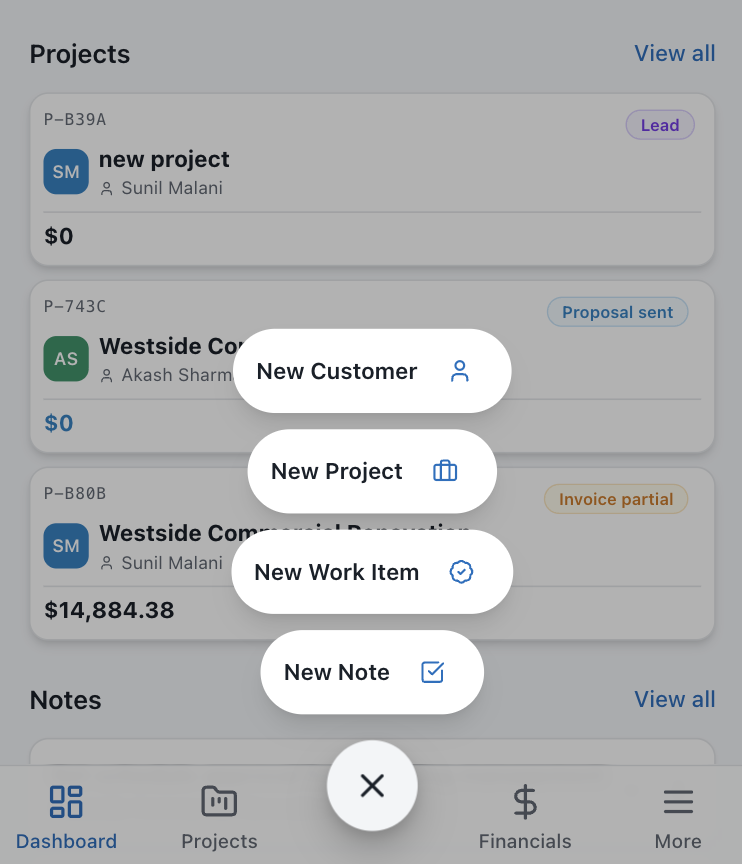
FieldHand app dashboard with the quick-create menu open, listing New Customer, New Project, New Work Item and New Note
04 · How It Works

Get Started with FieldHand in Three Simple Steps

  1. 1

    Set Up Your Project

    Create a project and organize its essential details, proposal information, and related documents.

  2. 2

    Manage Work and Changes

    Track the initial proposal, manage change orders, and keep project information updated as work progresses.

  3. 3

    Track Finances and Documents

    Review transaction history, monitor project financial activity, and manage documents throughout the project lifecycle.

05 · Why FieldHand

Built to Make Contractor Workflows Easier

Better Organization

Keep proposals, changes, financial records, and documents structured.

Greater Visibility

Understand project changes and transaction history more easily.

More Efficient Workflows

Reduce unnecessary manual coordination between project activities.

Improved Financial Tracking

Review financial activity at both the individual proposal level and the overall project level.

Ready to Simplify Your Construction Workflows?

Talk to us about bringing your proposals, change orders, and project documents into one organized place.

Contact Us